Tips for Working in CMYK for Print – Computer Arts

I started reading computer arts magazine and i noticed they had an article that they interview Ed Templeton from Red Design, I immediately thought that i should share this interview from the magazine as I thought it could benefit others and get some quick tips about print design.

Print design isn’t talked about enough in the web design community and id like to learn more about it as I’m from an intense web based background and hopefully others do too, this should be a nice start to a series of posts about print design in the coming weeks if you’d like to contribute a post feel free to contact me.

The Interview from Computer Arts magazine

    Make a plan

    At an early stage, decide what paper stock you’re printing on and what finish will be applied: matt, gloss, varnish, laminate and so on. Are there any benefits or limitations to your choice of paper and finish that you should bear in mind while designing.

    Talk to your printer

    Describe your project to your printer to get their grids or agree delivery requirements early on. A good printer will advise you of any potential problems with your design or stock choices – and may offer alternatives.

    The Right Tools

    Use the right software for the job. Just because you know Photoshop doesn’t mean you should design a magazine in it! Create and amend images in pixel-based programs such as Photoshop; make illustrations and so on in vector based programs; and compile and lay out for print in programs such as InDesign.

    Understand CMYK

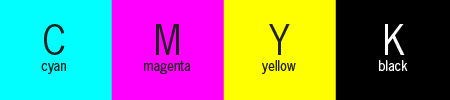
    The coloured inks Cyan, Magenta, Yellow and Key (or Black) are laid down in that order, Black being last and acting as ‘Key’ that locks the image together. Once you understand the process you can use it in creative ways such as overprinting blocks of C, M or Y or creating a ‘rich black’ of K plus some C, M and Y.

    Get colour reference

    Using colours swatches at the design stage such as ‘Pantone Solid to Process’ or ‘4-Colour Process Guide’ is invaluable. Most monitors aren’t perfectly print-calibrated, so colours on screen wont look the same in print – check the coated and uncoated swatches to get a better idea.

    Working in RGB

    When using images its much easier to manipulate an retouch them in RGB mode in Photoshop, When you’re done, flatten the image and convert to CMYK before placing it in your layout software.

    Don’t fake fonts

    Use only the actual fonts for bold, italic, and other styles when having a document printed commercially. If you’ve used the software fake italic, it’s possible that the text won’t show up as italic when printed. Besides the real font has been designed for the purpose better.

    Bleed and Slug

    The bleed and slug areas are trimmed away at the documents final size. The former is the area beyond the trim line for images or other elements that you want to ‘bleed’ off the edge of he page. The latter is an area where you can put non-printing information, such as project details.

    Do a pre-flight

    This is a final quality check that you can perform to make sure the printer is getting all the files, fonts and images in the right formats. It used to be a manual process, but these days most layout programs will do it automatically, so there’s no excuse.

    Proof for perfection

    Ideally, your printer will provide a proof you sign off before the job goes ahead. If that’s not possible you can run some checks on your print-ready PDF. Using Acrobat to preview separations, ink coverage, transparency and overprinting.

Interview Summary

  • know what paper your going to use or want and notify your printer.
  • Get advise from your printer, for recommendations on your project that you want printing
  • Try to use the right tools for creating print documents such as Adobe InDesign
  • Use the actual font that is supplied so if its not italic don’t make it italic in the program such as Photoshop
  • Make sure your content is inside the bleed and slug
  • Do a pre flight to see if there are any problems with your work.
  • Test your document that you have had printed for quality.

More Information

here are a few more things to consider when deciding on your paper choice for print and what effect it will have.

  1. Opacity of the paper: in reference to how much you can see through the paper e.g. A magazines pages will want less opacity otherwise the reader maybe put off by the text showing through the paper.
  2. Thickness of the paper: The right thickness of paper should be used as thick paper costs more and can make documents look thicker than they actually are such as books, and e.g. Business cards use thick paper / card.
  3. Brightness: If the paper is coated in varnish a lot of light will be reflected from the paper, if the paper is too bright this can prevent who ever is reading the page from seeing certain parts. e.g. magazine covers.
  4. Strength of the paper: paper bags, or shoe boxes have a particular need to be durable and strong due to the amount of weight that will be put on them, where as other things such as magazine pages don’t need to be.

Useful Links about Print

  1. Crops and Bleeds – Setting up print bleeds in Photoshop, Illustrator and Indesign
  2. Colour Code Chart – Colour Codes Matching Chart HTML (Convert CMYK, RGB Hex)
  3. Megapixels – Pixel resolution and print sizes
  4. CYMK – Every thing about CMYK
  5. Print Designers – An intresting look in to print design
  6. Colour Theory 101 – Increasing and decreasing the amount of colour CMYK and RGB

This is just an introduction

Hopefully this post can get you thinking more about printing work to quality standards and preperation, this is just an introduction to a series of posts dedicated to print design and how to go about doing it the right way.

Guest Post: Enhance Your Web Designs with Javascript

I just posted a guest post on myinkblog while he’s away you can check it out by clicking the link below.

Enhancing web designs with JavaScript

There is lots of useful Javascript based plugins that I hope you will agree will help produce some great aspects in your designs. Some of htem can be subtle from tabbed based navigation to a step by step wizard.

What Next

Well I’ve not posted a big article in a while on design shard but don’t worry I have a mass of things that I want to do, inspiration posts, tutorials, and competitions, I cant wait so stay tuned for that.

All the information that I gathered from he poll I will use to make the blog a better place and more interesting articles thanks all who have voted. go and see the poll

Poll: Cast your vote : What interests you most in design?

Design shard is getting to have quite a few subscribers and visitors which is great it makes me really excited and happy that people can benefit from the posts that are on the blog and posts that will be posted in the future.

Ive got a poll rigged up to enable me to see what you as readers are interested in and quite possibly see more of on the blog, this will hopefully create some great reading material that every one will benefit from in the future.

Im using a wordpress plugin to generate this poll you can find it here : wp-polls

The Poll Answer Info

The categories in the poll cover basically everything in that category such as digital illustration, includes drawing techniques, tutorials, inspiration etc.

The Poll – You can choose up to 3 options

[poll id=”2″]

Missed Something Your Interested In?

This post is all about what you like and want to see on the blog if its not in the poll let me know in the comments what interests, but make sure its design related :)

Illustration Artists Showcase and Inspiration – Part 1

I have a great interest in illustration and I am always looking for inspiration and new ideas and techniques that I could try and integrate in to my designs, looking at some of these illustrations you can see what makes them, whether it be blurring shapes, adding a light source or using photos in your illustrations it all has an effect on the final piece.

This collection is mixture of more traditional illustration to photography and illustration, when I look at illustrations like this I always think about how there made, such as paint splatters did the designer take a can of spray scan it in and manipulate it, stuff like that can add a whole new dimension to the illustration.

Take a look at this web site to see some beautiful designs Cool Showcase.

I have added some of the more well known illustrators in to the list to show there work with other not so well know illustrators…its all good and there all very talented.

Other Blog illustration collections

So you want to see more illustrations well check out some of the other collections that people have made

Interesting reading material and Tutorials

What to know more or brush up on some skills to help create amazing illustrations check out some of the resources below

Computer arts magazine illustration tutorials

Computer arts magazine is one of the best sources for keeping up to date with skills check out some of there useful tutorials>

  • Anatomy illustrated – The essential concepts of medical illustration. The fundamentals of digital pen and ink techniques in Illustrator
  • Draw a fantasy figure – Melissa Somerville uses drawing and inking techniques in Photoshop to create an enchanting anime-style fairy
  • Colour your fantasy figures – Refine your Photoshop tool skills to colour your characters and situate them in magical fantasy environments
  • Combining photography with hand-rendering – Create richer images by blending drawing, painting and fashion photography. Alexis West describes some invaluable techniques
  • Create Striking Portraits
  • Expressive lighting effects – Lighting effects are an effective way to add a detailed illustrative touch to a photo. Justin Maller demonstrates how to go about combining several lighting techniques
  • Vivid colour effects – Photoshop wizard Jort Braam combines abstract images with black and white photography, using gradients, blurs and Blending Modes to create a stunning composited image that’s bursting with colour and movement
  • The secrets of illustration – This month, 3D World’s panel of experts provides tips to help you produce 3D illustrations quicker and more flexibly: from the use of stock assets to vital Photoshop tricks

Off Topic – Design Competitions and Prizes

There are a few interesting things happening with in the design blogging community so why not show your support by checking some of them out.

  1. Styletime Blog action day contest win some great design prizes by donating at least 1$ that will be given to the charity for poverty.
  2. Myinkblog is holding a great Big Typography poster competition with some great prizes so get your design head on for that one ill see you there.

Blog Action Day – Massive Fund Raiser + Prizes

Ok so blog action day isnt technically yet, but over at styletime hes holding a massive fund raiser for this event, all funds donated will go to the blog action day charity towards poverty.

Paul walsh is taking the donations as he is a familiar face in the community but styletime has made a massive effort to get prizes collected that you will win, all you have to do is donate at least 1$ to this noble cause.

The Prizes

The prize list is massive, just some of the prizes that you can win are…

1. All 84 Gomedia Vector packs from the Ultimate Packs 1 and 2

2. A 1 year PSDTUTS Plus membership AND (YES 2 Prizes!) $250 to spend on FlashDen/AudioJungleThemeForest Mental! Collis (not everyone knows Collis)and Envato!

3. Single License copy of ‘Proudfolio’ from the w00t gent’s at woothemes.

AND MANY MORE …

So What are you waiting for go and donate now at Styletime and check out the prize list and think about poverty as you make your donation